How to Use AI Dash Cams Without Losing Driver Trust
AI dash cams are quickly becoming one of the most valuable safety tools in commercial fleet management. They can detect risky behaviours such as distracted driving, tailgating, fatigue indicators, seat belt non-use, and harsh driving events. They can also provide video evidence after a collision, helping protect both the company and the driver when the facts are disputed.
But there is another side to the conversation: privacy.
For many professional drivers, the concern is not simply “there is a camera in the cab.” The real concern is how that camera will be used. Will it record all day? Will audio be captured? Who can watch the footage? Will one clip be taken out of context? Will the system be used for coaching, or will it become a “gotcha” tool?
Those concerns are valid. A fleet can install the best safety technology available and still lose the trust of its best drivers if the rollout feels secretive, punitive, or excessive. The goal is not just to add AI dash cams. The goal is to build a safety program that drivers understand, respect, and believe is there to protect them.
Why Fleets Are Turning to AI Dash Cams
Distracted driving remains a serious road safety issue. According to the National Highway Traffic Safety Administration, distracted driving claimed 3,208 lives in 2024 and injured more than 315,000 people. For commercial fleets, even one preventable crash can lead to vehicle downtime, injury risk, insurance claims, legal exposure, and damage to company reputation.
Traditional dash cams mainly record what happened. AI dash cams go further by helping identify risky behaviour before it becomes an accident. For example, an AI-powered system can detect a driver looking at a phone, following too closely, showing signs of fatigue, or driving without a seat belt. Instead of waiting until a crash occurs, the system can trigger an in-cab alert and give the driver a chance to self-correct.
That is why in-cab coaching matters. The FMCSA’s onboard monitoring system research notes that targeted driver feedback can help address risky behaviour during real-time driving. In practical terms, that means safety teams do not have to rely only on after-the-fact discipline. They can use short, specific, video-backed coaching moments to help drivers improve.
The Privacy Problem: Drivers Do Not Want to Feel Watched All Day
The biggest mistake fleets make is treating AI dash cams like a plug-and-play hardware upgrade. To drivers, inward-facing cameras are personal. The cab is where they spend long hours, take calls during breaks, eat meals, and manage the stress of the road. Even though the vehicle is a workplace, drivers may still feel that continuous monitoring crosses a line.
Geotab’s driver research highlights this tension clearly. In a survey of more than 3,500 professional drivers, 92% expressed concern about in-cab cameras, but 92% also said they would be willing to overlook those concerns if footage could prove they were not at fault after a collision. The takeaway is important: drivers are not automatically against technology. They want transparency, fairness, and proof that the system protects them too.
This is where fleet managers need to change the message. AI dash cams should not be introduced as surveillance. They should be introduced as a safety and protection tool that supports drivers, documents facts, and helps prevent serious incidents.
Start With a Clear Dash Cam Policy
Before installing driver-facing cameras, fleets should create a written dash cam policy. This policy should be easy to understand and shared with every driver before rollout.
The policy should answer these questions:
- What does the camera record?
- When does it record?
- Does it capture audio?
- Who can access footage?
- How long is video stored?
- What events trigger review?
- Can footage be used for discipline?
- Can drivers request footage after an incident?
- How will coaching be handled?
- What happens during breaks, off-duty time, or personal use?
This is not only a trust-building step. It is also a compliance step. Employee monitoring rules vary across the United States. For example, New York’s electronic monitoring notice law requires covered employers to provide prior written notice for certain forms of electronic monitoring, while Connecticut’s electronic monitoring statute requires prior written notice for affected employees in many monitoring situations.
Fleet operators should work with legal counsel to confirm the rules that apply in every state where they operate. A multi-state fleet may need a higher standard than a single-location fleet.
Be Careful With Audio Recording
Video and audio should not be treated the same. Audio recording can create additional legal and privacy risk because consent laws vary by state. The Reporters Committee for Freedom of the Press recording guide explains that federal law generally follows a one-party consent standard, but several states require all-party consent for certain recordings.
For fleets, the safest approach is often to disable in-cab audio unless there is a clear operational need, documented consent, and legal review. Many safety goals can be achieved with road-facing video, driver-facing event clips, telematics data, and AI-triggered alerts without recording private conversations in the cab.
If audio is used, the policy should say so plainly. Drivers should know whether audio is active, when it is active, who can access it, and why it is needed.
Use Event-Based Review Instead of Constant Surveillance
One of the best ways to reduce privacy concerns is to avoid constant manual review. Drivers are more likely to accept dash cams when they understand that managers are not casually watching live video throughout the day.
A better model is event-based review. The system records or uploads clips when a defined safety event occurs, such as a collision, harsh braking, distracted driving alert, tailgating event, or driver-initiated recording. This keeps the focus on safety rather than surveillance.
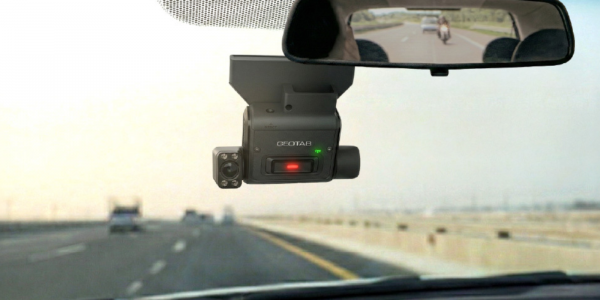
Geotab’s GO Focus Plus AI dash cam is built around this coaching model. Critical events become coaching opportunities inside MyGeotab, where managers can review video context, risk level, and recommended next steps. Geotab also explains that GO Focus Plus detects risk in real time because AI models run directly on the device, allowing the camera to trigger in-cab voice feedback when risky behaviour is detected.
That distinction matters. If the driver can self-correct in the moment, the camera is not just a recorder. It becomes a real-time safety assistant.
Make Coaching Constructive, Not Punitive
The fastest way to lose driver buy-in is to use dash cam footage only for discipline. If every alert becomes a warning letter, drivers will see the system as a threat. If footage is used only after something goes wrong, the program will feel one-sided.
Instead, fleets should build a coaching-first process.
A strong coaching process focuses on patterns, not one-off mistakes. It separates minor coaching moments from serious safety violations. It gives drivers a chance to explain context. It documents improvement. It recognizes safe driving, not just risky behaviour.
For example, if a driver receives several following-distance alerts over two weeks, the coaching conversation should focus on helping that driver identify when and why the issue happens. Is it route pressure? Traffic congestion? Dispatch timing? Fatigue? Equipment condition? Good coaching looks for the cause, not just the clip.
This approach helps drivers feel respected. It also helps managers address the real operational issues behind risky events.
Give Drivers Access to the Benefits
Drivers are more likely to accept AI dash cams when they see how the system helps them personally. Dash cam footage can protect drivers from false claims, unclear accident reports, and unfair blame after a crash. Road-facing and driver-facing context can show whether the driver was attentive, wearing a seat belt, following procedure, and reacting appropriately.
This is an important part of the rollout conversation. Do not only tell drivers that cameras help the company reduce risk. Tell them how cameras can help prove they did the right thing.
A driver who understands that video can protect their licence, reputation, and job is more likely to view the system as a safeguard instead of a threat.
Limit Access to Footage
Privacy is not only about what is recorded. It is also about who can see it.
Fleet managers should limit video access to employees who need it for safety, claims, compliance, or maintenance-related investigations. Access should not be open to every dispatcher or supervisor. Ideally, the system should support role-based permissions, audit trails, and clear approval processes.
The policy should also state that footage cannot be downloaded, shared, or used outside approved business purposes. Clips should not be used for entertainment, gossip, social media, or casual review. A single misuse incident can damage trust across the entire fleet.
This aligns with broader privacy expectations around responsible data handling. Geotab’s privacy commitment emphasizes customer data control, transparency, privacy by design, data protection, and configurable privacy settings.
Avoid AI Overreach
AI can help identify patterns, but it should not replace human judgment. A dash cam alert is not the same as a complete investigation. Lighting, camera angle, road conditions, unusual cargo, emergency situations, or a driver’s reasonable explanation may change the meaning of a clip.
The Federal Trade Commission has warned that companies using AI must respect privacy and confidentiality commitments, noting that AI systems often have a strong incentive to collect more data than necessary. The FTC has also taken action against companies that deployed facial recognition technology without reasonable safeguards, showing that automated surveillance tools can create risk when organizations fail to control accuracy, fairness, transparency, and harm.
For fleets, the lesson is simple: use AI to prioritize review, not to automatically punish drivers. Human review, consistent standards, and a fair appeal process are essential.
Install Cameras Correctly
Privacy and compliance are not the only concerns. Dash cams must also be installed safely. Under 49 CFR § 393.60, devices with vehicle safety technologies mounted inside the windshield must be placed within specific areas and outside the driver’s sight lines to the road, signs, and signals.
A poor installation can create driver frustration, inspection issues, and safety problems. Fleets should use trained installers and confirm that camera placement does not obstruct visibility or interfere with normal vehicle operation.
Roll Out the Program in Stages
A privacy-first rollout should be gradual. Start with a small pilot group, gather feedback, adjust the policy, and then expand. Include respected drivers in the pilot group, not just managers. Ask them what feels unclear, what feels intrusive, and what would make the system more acceptable.
During training, show real examples of how events are reviewed. Explain what managers can and cannot see. Demonstrate how in-cab alerts work. Explain how coaching will be documented. Make it clear that the program is designed to reduce collisions, protect drivers, and improve safety culture.
The more transparent the rollout, the less room there is for rumors.
The Best Drivers Want Fairness
Your best drivers are usually not afraid of accountability. They are afraid of unfair accountability. They do not want one clip taken out of context. They do not want private conversations recorded without explanation. They do not want a system that assumes guilt before review.
A successful AI dash cam program respects that. It uses event-based footage, limits unnecessary data collection, disables audio unless needed, protects access, trains managers, and gives drivers a fair voice in the process.
When implemented well, AI dash cams do not have to compete with privacy. They can support privacy by reducing unnecessary review, focusing only on meaningful safety events, and helping drivers prove their professionalism.
Build a Safer Fleet Without Losing Driver Trust
AI dash cams can reduce risk, improve coaching, support claims defense, and help drivers self-correct before a serious incident occurs. But the technology is only as strong as the policy behind it. Fleets that communicate clearly, protect driver privacy, and use footage responsibly are more likely to keep their best drivers engaged.
At GPS Tracking America, we help fleets implement Geotab-integrated GPS tracking, AI dash cams, driver coaching workflows, and fleet safety tools in a way that supports both operational visibility and driver trust. If your business is ready to improve safety without creating a surveillance culture, contact us today to learn how our Geotab-based solutions can help you build a smarter, safer, and more transparent fleet program.
Frequently Asked Questions
What are AI dash cams for fleets?
AI dash cams are vehicle cameras that use artificial intelligence to detect risky driving behaviours, record safety events, and support driver coaching. They can help fleets identify distracted driving, tailgating, fatigue signs, harsh braking, and other risks.
Why are fleets using AI dash cams?
Fleets use AI dash cams to improve road safety, reduce accidents, protect drivers from false claims, support insurance investigations, and provide better coaching based on real driving events.
Do AI dash cams record drivers all the time?
Not always. Many AI dash cam systems can be configured for event-based recording, meaning video is captured or uploaded when a specific safety event occurs, such as harsh braking, a collision, or distracted driving.
Are driver-facing cameras legal?
Driver-facing cameras can be legal, but fleets must follow applicable privacy, employment, consent, and monitoring laws. Rules can vary by state, so fleets should review local requirements before rollout.
Why are drivers concerned about in-cab cameras?
Drivers may worry that in-cab cameras will be used for constant surveillance, unfair discipline, audio recording, or taking clips out of context. These concerns can affect trust if the program is not explained clearly.
How can fleets reduce privacy concerns with AI dash cams?
Fleets can reduce privacy concerns by creating a clear camera policy, limiting access to footage, using event-based recording, disabling unnecessary audio, explaining how footage is used, and focusing on coaching instead of punishment.
Should AI dash cams record audio?
In many cases, fleets should avoid recording audio unless there is a clear business need and legal review. Audio recording can create additional privacy and consent issues, especially in states with stricter recording laws.
What is event-based video review?
Event-based video review means managers only review footage when a defined safety event occurs. This can include collisions, harsh braking, speeding, distracted driving alerts, tailgating, or driver-triggered recordings.
How do AI dash cams help with driver coaching?
AI dash cams help coaching by showing what happened before, during, and after a safety event. Managers can use short video clips to explain risky behaviours, identify patterns, and help drivers improve.
How can fleets avoid creating a gotcha culture?
Fleets can avoid a gotcha culture by using dash cam footage for coaching, recognizing safe driving, reviewing patterns instead of isolated mistakes, and giving drivers a fair chance to explain the situation.
Can AI dash cams protect drivers?
Yes. AI dash cams can protect drivers by providing video evidence after a crash, customer complaint, or false claim. Footage can help show that a driver was attentive, following procedures, and not at fault.
Who should have access to dash cam footage?
Access should be limited to authorized staff who need it for safety, coaching, claims, compliance, or investigations. Footage should not be available for casual viewing or shared outside approved business purposes.
How long should fleets keep dash cam footage?
Retention periods depend on company policy, legal requirements, insurance needs, and the type of event recorded. Fleets should define how long footage is stored and delete unnecessary video when it is no longer needed.
What should be included in a dash cam policy?
A dash cam policy should explain what is recorded, when recording happens, whether audio is used, who can access footage, how long video is stored, how coaching works, and how footage may be used after incidents.
Should drivers be told before cameras are installed?
Yes. Fleets should clearly inform drivers before installing AI dash cams. A transparent rollout helps reduce confusion, build trust, and support compliance with employee monitoring requirements.
Can AI dash cams improve driver retention?
Yes, if implemented correctly. Drivers are more likely to accept dash cams when the system is fair, transparent, focused on safety, and used to protect them as well as the company.
What is in-cab coaching?
In-cab coaching uses real-time alerts or video-based feedback to help drivers correct risky behaviours. For example, a system may warn a driver about distraction, following too closely, or fatigue indicators.
Can AI dash cams lower insurance risk?
AI dash cams may help reduce insurance risk by improving safety, documenting incidents, and showing that the fleet actively manages driver behaviour. However, insurance savings depend on the provider, claims history, fleet type, and safety performance.
How should fleets introduce AI dash cams to drivers?
Fleets should introduce AI dash cams with a clear explanation of the purpose, policy, privacy protections, coaching process, and driver benefits. A pilot program can also help gather feedback before full rollout.
How can GPS Tracking America help with AI dash cam implementation?
GPS Tracking America helps fleets implement Geotab-integrated GPS tracking, AI dash cams, driver coaching tools, and fleet safety solutions. Our team can help businesses improve visibility and safety while supporting a transparent, driver-friendly rollout.