Real-Time Alerts & Notifications

Real-Time Alerts & Notifications
Managing a fleet means keeping track of vehicles, drivers, and daily operations across multiple locations. However, constantly monitoring every vehicle isn’t practical. Real-time fleet alerts help you stay informed by notifying the right people when specific vehicle or driver activities require attention.

Stay Informed When Important Fleet Events Occur
With Geotab’s MyGeotab GPS tracking platform, you can configure rules to monitor specific fleet conditions and generate notifications when those conditions are met. Rather than continuously checking vehicle locations and activity, fleet managers can receive relevant updates and investigate potential issues as they occur.
From speeding and excessive idling to unauthorized vehicle use and potential collisions, customized alerts help businesses maintain better oversight of their fleets.

Monitor the Fleet Activities That Matter Most
Every business has different operational priorities. MyGeotab allows fleet managers to use existing rules or create customized conditions that monitor the activities most relevant to their operations.
Speeding and Risky Driving
Monitor speeding and other driving behaviours that could increase safety risks, fuel consumption, and vehicle maintenance costs. Fleet managers can configure rules around speed thresholds, harsh acceleration, harsh braking, and harsh cornering to identify potentially unsafe driving patterns.
These events can also provide useful information for driver coaching and fleet safety programs.
Excessive Idling
Unnecessary idling increases fuel consumption, engine hours, and operating expenses. Create alerts when vehicles remain idle beyond a specified period, helping managers identify excessive idling and address recurring issues.
Geofence Entry and Exit Alerts
Create rules around important locations such as customer sites, warehouses, terminals, and company facilities. Notifications can be triggered when vehicles enter or leave designated zones, giving dispatchers greater visibility into vehicle movements and helping businesses monitor site visits.
After-Hours Vehicle Activity
Unauthorized vehicle use outside scheduled working hours can create unnecessary expenses and additional security concerns. Configure rules around designated work hours to identify vehicle activity that occurs outside normal operating schedules.
Collision Detection
MyGeotab includes Major Collision and Minor Collision rules that use AI-powered detection models to identify potential vehicle collisions. When a qualifying event is detected, fleet managers can receive notifications and review available information, including the event’s location, time, and impact details.
These notifications help businesses respond to potential incidents, investigate vehicle damage, and improve fleet safety oversight. Detection capabilities and reporting times depend on device compatibility and configuration.
Hours of Service Notifications
For fleets using Geotab Drive, configured reporting can help dispatchers monitor driver Hours of Service (HOS) compliance. For example, the ELD: Notify Dispatch If Driver Is Approaching Limit report can notify managers when drivers are approaching their available driving limits.
Geotab’s implementation guide describes this report as providing an alert within 30 minutes when configured with a 30-minute reporting schedule.
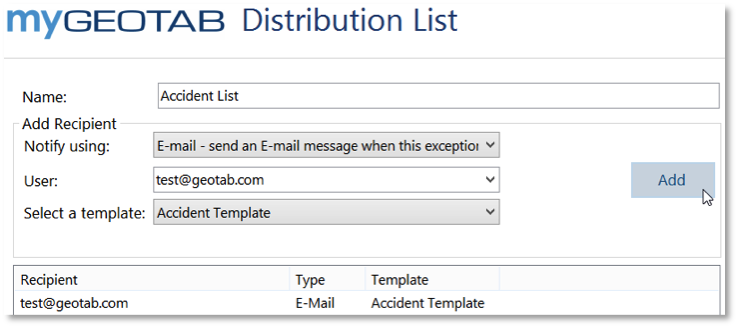
- Email notifications: Send event details to selected users or groups.
- On-screen alerts: Display standard or urgent notifications within MyGeotab.
- Notification logs: Review triggered notifications within the platform.
- In-vehicle feedback: Provide drivers with audible alerts or other feedback through compatible equipment.
- SMS notifications: Text message notifications may be available on eligible accounts, subject to feature availability and configuration.
Notification templates and recipients can also be customized to suit your business requirements. Learn more in Geotab’s MyGeotab Rule Notifications Guide.
Customize Alerts to Fit Your Business
Every fleet has different priorities. MyGeotab allows administrators to use existing rules or create customized conditions based on factors such as vehicle speed, idling duration, driver activity, operating hours, and designated locations.
For example, a delivery company could receive notifications when vehicles arrive at customer locations, while a construction business might monitor after-hours activity around its equipment yard. These rules help businesses focus on the events that matter most to their operations.

Get Started with Customized Fleet Alerts
Want better visibility into your fleet’s daily activities? Contact us to learn how Geotab GPS tracking and customized notifications can help you monitor your vehicles, support safer driving, and improve fleet efficiency.
Frequently Asked Questions
What are fleet alerts?
Fleet alerts are automated notifications generated when a vehicle or driver meets specific conditions configured within a fleet management system. They help businesses monitor activities such as speeding, excessive idling, geofence activity, and after-hours vehicle use without constantly checking their tracking platform.
What types of alerts can I configure in MyGeotab?
MyGeotab supports a wide range of rule-based notifications. Examples include speeding, harsh driving, excessive idling, geofence entry and exit, after-hours activity, vehicle-related conditions, and certain safety events. Available alerts depend on the rules, hardware, and vehicle data configured for your fleet.
Can I receive alerts when a driver exceeds the speed limit?
Yes. MyGeotab includes speeding rules that can monitor vehicle speed against configured thresholds or available road speed limit information. Fleet managers can configure notifications when qualifying speeding events occur and use the recorded information to investigate incidents or support driver coaching.
Can I receive notifications when a vehicle enters or leaves a geofence?
Yes. MyGeotab allows fleet managers to create rules around designated zones. Separate rules can monitor when vehicles enter or exit particular locations, such as customer properties, warehouses, terminals, and company facilities. Notifications can then be configured for the relevant events.
Can MyGeotab alert me about excessive vehicle idling?
Yes. Idling rules can monitor how long vehicles remain idle and trigger events when configured time or location conditions are met. These alerts help fleet managers identify unnecessary idling, review recurring patterns, and take steps to reduce wasted fuel and engine hours.
Can fleet managers receive alerts about after-hours vehicle use?
Yes. MyGeotab supports rules that use designated work hours to identify vehicle activity outside normal operating schedules. Businesses can use these notifications to monitor unauthorized vehicle use and maintain better oversight of their fleet outside business hours.
How are fleet alerts delivered to users?
Depending on the notification configuration, MyGeotab can send email notifications, display standard or urgent pop-up alerts, record notifications within the platform, and provide in-vehicle driver feedback through compatible equipment. SMS notifications may also be available on eligible databases.
Can multiple employees receive the same fleet alert?
Yes. Notification recipients can be configured to include relevant users or groups. This allows fleet managers, dispatchers, and other authorized personnel to receive information about events that relate to their responsibilities.
Can I customize the information included in fleet notifications?
Yes. MyGeotab supports customizable notification templates. These templates can incorporate variable information, such as the vehicle involved and recorded event details, along with customized message content. This helps recipients understand the reason for an alert and determine what action may be necessary.
Does MyGeotab support SMS text message alerts?
SMS notifications are supported for certain MyGeotab rule notifications, but availability depends on the database and enabled functionality. Geotab’s documented SMS feature includes regional and configuration limitations, and recipients may need to opt in. Contact your GPS Tracking America representative to confirm current availability for your account.
Can Geotab notify dispatchers when a driver approaches their Hours of Service limit?
Yes. Fleets using Geotab Drive can configure HOS reports to notify dispatchers when drivers are approaching their available driving limits. The ELD: Notify Dispatch If Driver Is Approaching Limit report is designed to provide an email notification within 30 minutes when configured with a 30-minute refresh schedule.
Does Geotab support automatic collision detection alerts?
Yes. MyGeotab includes Major Collision and Minor Collision rules that use AI-powered detection models to identify potential vehicle collisions. Fleet managers can configure notifications to alert selected users when qualifying events are detected. Available functionality depends on device compatibility and account configuration.
Are fleet alerts delivered instantly?
Alert timing depends on the type of event, device capabilities, incoming vehicle data, network connectivity, and notification configuration. Some rule notifications can be generated promptly when conditions are met, while scheduled reports operate according to their refresh intervals. Collision detection also involves processing time before an event is reported, so not every alert should be considered instantaneous.
Can I review fleet alerts after they have been triggered?
Yes. Rule violations generate events that are recorded in MyGeotab. Authorized users can review relevant events within the platform, investigate vehicle activity, and use the information to identify recurring operational issues or driving behaviours.
Do all GPS tracking devices support every type of fleet alert?
No. Available alerts depend on the installed tracking device, vehicle compatibility, available diagnostic information, connected equipment, and platform configuration. Certain features, including collision detection and some in-cab feedback options, have specific hardware requirements. It is important to confirm compatibility when selecting features for your fleet.