Geotab Cloud History
Geotab helps businesses preserve valuable fleet information instead of limiting them to a short viewing window. Geotab’s vehicle rate plans include at least one year of cloud storage, along with tools for exporting information to local files. This gives authorized MyGeotab users convenient access to historical records such as trips, locations, mileage, idling, safety events, engine activity, faults, and other supported telematics data. Retention settings can also be managed by database administrators to meet specific operational requirements. By combining cloud-based history with local export capabilities, Geotab helps fleets analyze performance, maintain business records, and keep important information available for future use.
Review Historical Fleet Activity When Questions Arise
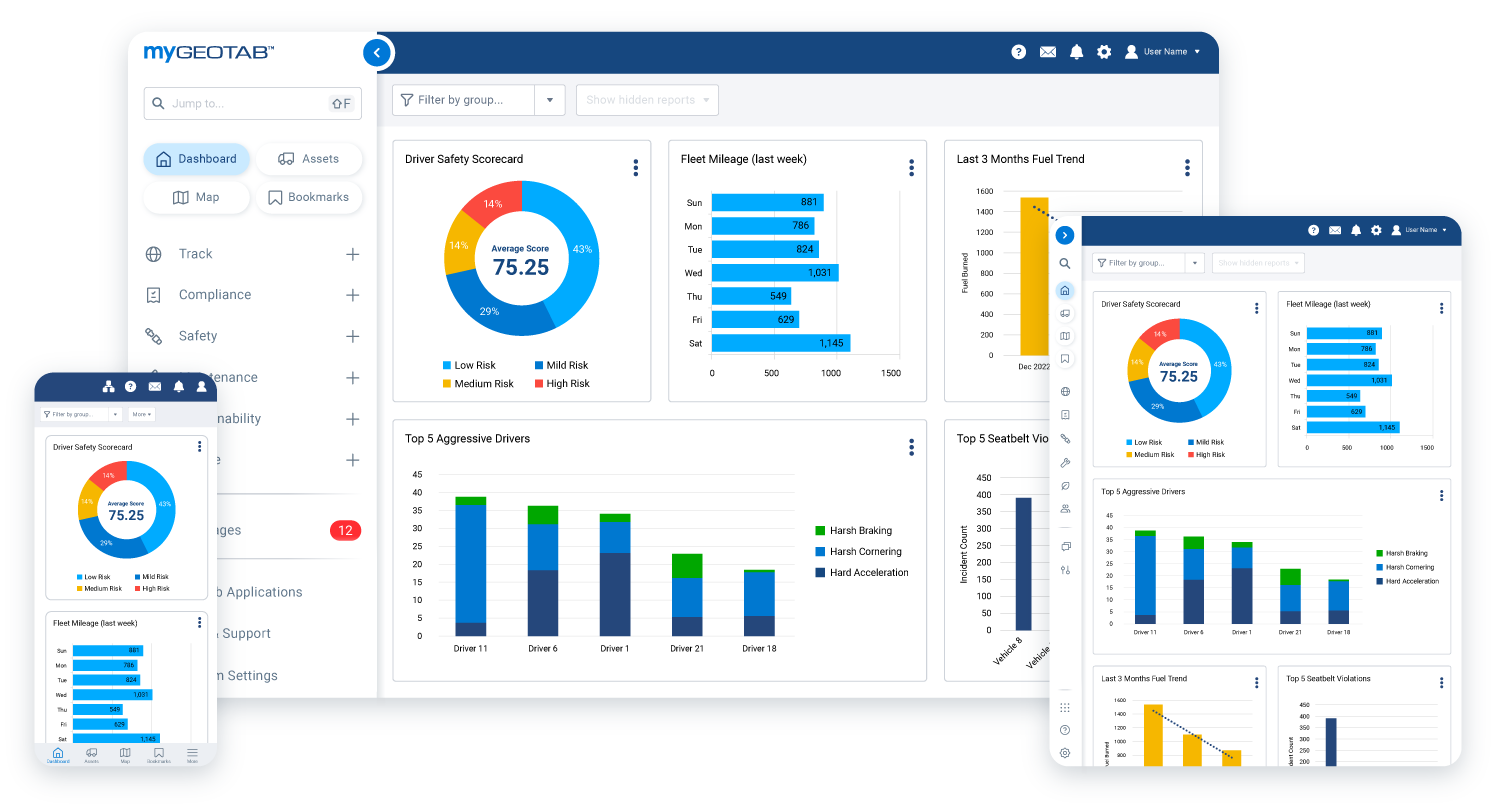
Access to at least one year of fleet history gives managers a reliable record for investigating past events and answering operational questions. Instead of relying on memory, handwritten notes, or scattered documents, authorized users can review available trip details, stops, routes, exception events, vehicle activity, and other recorded information in MyGeotab. Historical data can help resolve customer inquiries, confirm service visits, examine recurring safety concerns, and understand how vehicles were used over time. The result is better accountability and more informed decision-making supported by objective fleet records.


Identify Long-Term Trends and Improvement Opportunities
A full year of historical telematics data provides the context needed to distinguish recurring patterns from isolated events. Fleet managers can compare performance across vehicles, drivers, departments, seasons, or reporting periods to identify trends in mileage, idling, fuel or energy use, safety events, maintenance activity, and asset utilization. These insights can support better vehicle replacement planning, driver coaching, maintenance scheduling, route evaluation, and cost control. Because MyGeotab offers built-in and customizable reports, businesses can turn stored fleet history into practical information for both daily management and long-term planning.
Export Fleet Information for Greater Control and Flexibility
Geotab’s local file export tools allow businesses to retain selected fleet records outside MyGeotab when needed. Reports can be downloaded for internal archives, shared with authorized stakeholders, or incorporated into established accounting, compliance, insurance, maintenance, and business-analysis workflows. Local exports can also help organizations preserve information beyond their configured cloud-retention period, subject to their own storage, privacy, and security policies. This combination of cloud access and downloadable records gives fleets greater control over how they organize, protect, and use their operational data.

Build a More Complete and Accessible Fleet Record
Geotab cloud history and local export tools help transform everyday vehicle activity into a useful long-term business resource. Whether your organization needs to investigate an incident, evaluate performance, support recordkeeping, or plan future improvements, historical fleet data provides evidence that can lead to better decisions. GPS Tracking America can help your business select an appropriate Geotab solution, configure MyGeotab reporting and retention settings, and establish an effective export process. Contact us to learn how Geotab can provide dependable access to the fleet information your organization needs.
What does at least one year of history in the cloud mean in Geotab?
Geotab’s vehicle rate plans include one year of cloud storage for supported fleet data. This allows authorized MyGeotab users to review historical information without maintaining an on-site server. Actual data availability depends on the information received, the service plan, and the database’s configured retention settings.
What types of historical fleet data can Geotab store?
Depending on the vehicle, tracking hardware, service plan, and system configuration, MyGeotab can store trips, GPS positions, mileage, stops, idling, speeding, exception events, driver activity, engine hours, diagnostic faults, fuel or energy information, notifications, and other supported telematics records.
Can MyGeotab retain information for longer than one year?
Yes. Current MyGeotab data-purge settings allow many data categories to be retained for as long as eight years. The appropriate period should be selected according to the organization’s operational, legal, privacy, and recordkeeping requirements.
What is the default MyGeotab data-retention period?
Geotab’s current data-purge documentation states that the default retention period across data categories is two years. However, an administrator can configure different retention periods for supported data categories and groups.
Can a MyGeotab administrator change the retention period?
Yes. A user with company-wide administrator permissions can create data-purge schedules and select how long supported categories of information should remain in the database. This helps organizations align retention with their internal policies and operational needs.
Can different types of Geotab data have different retention periods?
Yes. MyGeotab divides information into categories such as driving and exception data, fuel transactions, Hours of Service data, asset inspection data, and personal trip data. Administrators can configure an appropriate retention period for each supported category.
What is local file export in MyGeotab?
Local file export allows authorized users to download selected reports or information from MyGeotab to a computer or another approved storage location. The exported files can be retained for internal records, reviewed offline, or shared with authorized stakeholders.
What file formats are available for Geotab exports?
Available formats depend on the page, report, and export method being used. MyGeotab reporting supports downloadable reports and options involving Excel, PDF, and CSV files. Users should select a format that is compatible with their reporting and recordkeeping requirements.
Can Geotab reports be downloaded directly to a computer?
Yes. Prepared MyGeotab reports can be downloaded to the user’s device. MyGeotab includes a My Reports area where authorized users can monitor report preparation and download reports once they are ready.
Can MyGeotab reports be exported for a specific date range?
Many MyGeotab reports allow users to select a reporting period, vehicles, drivers, or groups before generating the report. Available filters depend on the report, but they help users export the information relevant to a particular investigation or business requirement.
Can Geotab reports be scheduled automatically?
Yes. MyGeotab allows supported reports to be scheduled for regular delivery by email. Depending on the report configuration, scheduled reports may be delivered as Excel or PDF files, helping managers receive recurring information without generating each report manually.
Why should a fleet export data if it is already stored in the cloud?
Local exports provide an additional way to organize and preserve selected records. A business may export information for long-term archives, audits, internal analysis, insurance documentation, customer inquiries, or use in other approved business systems.
Does an exported file remain available after the original data is purged?
A properly downloaded file is stored separately from the MyGeotab database and is not removed by a later MyGeotab data purge. The organization becomes responsible for protecting, retaining, backing up, and eventually deleting that local file according to its own policies.
Does a MyGeotab data purge permanently delete historical information?
Yes. When a configured retention date is reached, the applicable data is permanently removed from the MyGeotab database. Geotab states that purged data cannot be recovered, so organizations should review their retention schedules and export necessary records before deletion.
Can historical Geotab data help investigate a customer complaint?
Yes. Available trip, location, stop, route, time, and driver records can provide objective information about past fleet activity. This may help a business confirm whether a vehicle visited a location, review arrival and departure times, or respond to a service-related question.
How can one year of fleet history improve business decisions?
A full year of history lets managers compare performance across different months, seasons, vehicles, drivers, and operating conditions. These comparisons can reveal recurring patterns in mileage, idling, fuel consumption, safety events, maintenance needs, and vehicle utilization.
Can historical Geotab data support maintenance planning?
Yes. When the required data is available, managers can review mileage, engine hours, fault activity, inspection information, and maintenance-related reports. Historical trends can help identify recurring vehicle problems and support more informed preventive-maintenance scheduling.
Can Geotab cloud history support compliance and recordkeeping?
Geotab records and reports can support internal documentation and certain regulatory workflows, including Hours of Service, asset inspections, and fuel-tax reporting when the appropriate features are enabled. However, using Geotab does not automatically guarantee compliance; each organization remains responsible for meeting applicable requirements.
Who can view or export historical data in MyGeotab?
Access depends on the user’s security clearance, assigned groups, and data permissions. Administrators can limit which vehicles, drivers, reports, and system functions each user can access, helping protect sensitive fleet information from unauthorized use.
How can GPS Tracking America help with Geotab data retention and exports?
As a Geotab reseller, GPS Tracking America can help businesses choose an appropriate Geotab solution, configure MyGeotab access, understand data-retention settings, and establish useful reporting and export processes. Contact us to discuss how your organization can preserve and use its historical fleet information effectively.